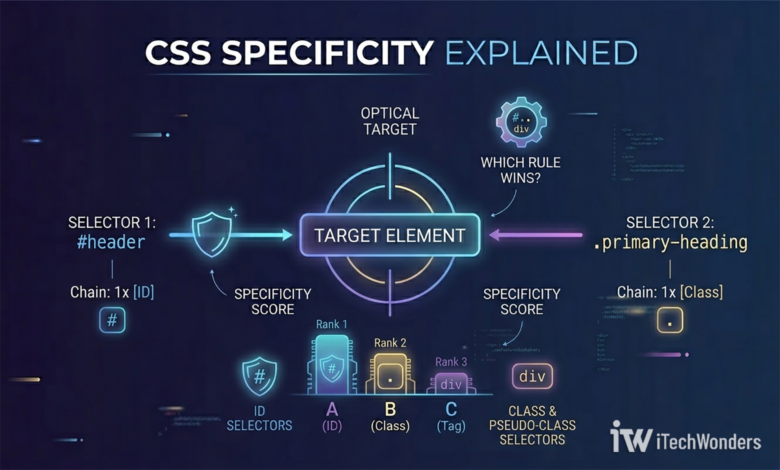
CSS specificity is one of those concepts that sound simple until your styles refuse to apply. It runs silently behind every layout you build, and mastering its mechanics can save you hours of frustrating debugging. In this article, we’ll deep dive into how browsers calculate selector hierarchy and discover why a real-world Microsoft stylesheet uses a selector with a staggering (0, 11, 0) score.
A Real-World Selector from Microsoft
Open DevTools on the Bing Webmaster Tools homepage and inspect one of the feature cards. You’ll find this CSS rule tucked inside Microsoft’s stylesheet:
CSS — from Bing Webmaster Tools.unsignedHomeLayout .homeContainer .mainContainer
.tealBackground .seoFeatures .containerLayout
.content .seoFeaturesContainer .featureCards
.featureCard:hover /* Specificity: (0, 11, 0) */
{
background: rgba(0, 0, 0, 0) linear-gradient(270deg, #61A1D9 0%, #0C5391 100%);
box-shadow: 0 0 0 1px rgba(0, 0, 0, .05);
}
It’s 10 class names, one pseudo-class, and a three-digit specificity score that reads like a bizarre set of coordinates. If you’ve never seen a selector this long before, it could easily be mistaken for a bug. It’s not — and by the end of this article you’ll understand exactly why it was written this way, what every piece of it means, and how the browser calculates that (0, 11, 0) score.
What the Dot and the Space Actually Mean
Two characters do almost all the heavy lifting in CSS selectors: a dot (.) and a space.
The dot — selecting by class
A dot before a word tells the browser: “find any HTML element that has this class attribute.” So .featureCard matches any element in the page that looks like this in HTML:
<div class="featureCard">...</div>
The space — the descendant relationship
A space between two selectors is not decoration. It means “the second element must be somewhere inside the first.” It does not have to be a direct child — it can be nested several levels deep — but the outer element must be an ancestor.
/* Selects any .card that lives anywhere inside .wrapper */
.wrapper .card { ... }

/* These are NOT the same thing: */
.wrapper.card  /* no space → one element that has BOTH classes */
.wrapper .card  /* space → .card nested inside .wrapper */
This kind of chained, space-separated selector has a formal name: a CSS Descendant Selector Chain. The selectors are not parallel declarations — they describe a single path through the HTML tree. The rule only applies to an element that satisfies every ancestor condition in that chain, from left to right.
Visualizing the DOM Tree
Every HTML page is structured as a tree — the Document Object Model (DOM). Parent elements contain child elements, which can contain their own children, and so on. A descendant selector chain maps directly onto a branch of that tree.
For the Microsoft selector above, the corresponding HTML structure looks like this:
<div class="unsignedHomeLayout">
  <div class="homeContainer">
    <div class="mainContainer">
      <div class="tealBackground">
        <div class="seoFeatures">
          <div class="containerLayout">
            <div class="content">
              <div class="seoFeaturesContainer">
                <div class="featureCards">
                  <div class="featureCard">
                    ← TARGET (on :hover)
                  </div>
                </div>
              </div>
            </div>
          </div>
        </div>
      </div>
    </div>
  </div>
</div>
The CSS only activates on .featureCard when it is a descendant of all those parent elements, in (exactly) that order. A .featureCard floating somewhere else in the page — outside that ancestor chain — would not receive the hover style. This is precise targeting by design.
When Rules Collide: Enter CSS Specificity
CSS is additive. Multiple rules can target the same element at the same time, and they often do. What happens when two rules disagree on how an element should look?
Let’s take a look at this example:
/* Rule A */
.featureCard:hover { background: red; }

/* Rule B */
.featureCards .featureCard:hover { background: blue; }
Here you can see, both rules target the same hovered element. The browser needs a tiebreaker. That tiebreaker is specificity — a scoring system that measures how precisely each selector identifies its target. The higher the score, the more authority the rule has. The winning rule’s styles/declarations are applied; others are overridden.
The Three-Column Scoring System
Think of specificity as a three-digit score written as (A, B, C). Each column counts a different category of selector:
| Column | What it counts | Examples |
|---|---|---|
| A — ID selectors | Selectors that use a # prefix | #header, #main-nav |
| B — Class-level selectors | Class selectors, pseudo-classes, attribute selectors | .card, :hover, [type="text"] |
| C — Element selectors | HTML tag names and pseudo-elements | div, p, ::before |
How comparison works
The three columns are compared from left to right, and the first column that differs decides the winner — regardless of how large the numbers in the other columns are. Column A always beats column B. Column B always beats column C. This is very different from ordinary arithmetic.
(0, 10, 0) does NOT beat (1, 0, 0). One ID selector outweighs any number of class selectors. The columns never “carry over” into each other.
Here’s a concrete comparison to make this intuitive. Both cards below target the same type of element — but the ID-based selector wins:
As you can see here, even though the second selector has 10 class names, a single #header wins. Column A = 1 beats Column A = 0 before column B is even consulted.
Counting specificity step by step
Let’s build up the score from simple to complex:
| Selector | A | B | C | Score |
|---|---|---|---|---|
div | 0 | 0 | 1 | (0, 0, 1) |
.card | 0 | 1 | 0 | (0, 1, 0) |
.card:hover | 0 | 2 | 0 | (0, 2, 0) |
.box .card:hover | 0 | 3 | 0 | (0, 3, 0) |
#header | 1 | 0 | 0 | (1, 0, 0) |
#header .card:hover | 1 | 2 | 0 | (1, 2, 0) |
div p span | 0 | 0 | 3 | (0, 0, 3) |
Counting Correctly — A Common Mistake
Now back to the Microsoft selector. Let’s count it token by token:
| Token | Type | Column |
|---|---|---|
.unsignedHomeLayout | class | B +1 |
.homeContainer | class | B +1 |
.mainContainer | class | B +1 |
.tealBackground | class | B +1 |
.seoFeatures | class | B +1 |
.containerLayout | class | B +1 |
.content | class | B +1 |
.seoFeaturesContainer | class | B +1 |
.featureCards | class | B +1 |
.featureCard | class | B +1 |
:hover | pseudo-class | B +1 |
| Total | B = 11 |
Final score: (0, 11, 0). No ID selectors, no element tag selectors — purely class-level.
:hover is a pseudo-class and counts as +1 in column B, every time. It is a separate token from the class name it’s attached to. .featureCard:hover contains two tokens — one class and one pseudo-class — and scores (0, 2, 0), not (0, 1, 0).

Pseudo-Classes vs. Pseudo-Elements
CSS has two related but distinct concepts that are easy to confuse at first glance, and they score differently.
Pseudo-classes → Column B
A pseudo-class (single colon :) targets an element based on its state or structural position. The element already exists in the HTML; the pseudo-class just refines when or under what condition the rule applies.
:hover           /* when the mouse is over the element */
:focus           /* when the element has keyboard focus */
:checked         /* when a checkbox or radio is selected */
:nth-child(2)    /* the 2nd child of its parent */
:not(.disabled)  /* any element that does NOT have the .disabled class */
All of the above contribute +1 to column B.
Pseudo-elements → Column C
A pseudo-element (double colon ::) targets a virtual piece of an element — something that doesn’t exist as a real DOM node but the browser renders as if it did.
::before        /* injected content before the element's content  */
::after         /* generated content after the element  */
::placeholder   /* the placeholder text in an input field  */
::first-line    /* the first rendered line of a paragraph or a block of text  */
These score +1 in column C, alongside regular HTML tag selectors like div or p.
Quick reference
| Type | Syntax | Column | Example |
|---|---|---|---|
| Pseudo-class | Single colon : | B | :hover, :focus, :nth-child() |
| Pseudo-element | Double colon :: | C | ::before, ::after, ::placeholder |
:before instead of ::before). Modern browsers still support this for backward compatibility, but the double-colon convention (::before) is the current standard and makes the distinction visually clear.
Can You Force CSS Specificity Higher Than It “Should” Be?
This is a question that comes up naturally once you understand the scoring system: what if you want a rule to win, but don’t want to restructure your HTML or add an ID?
You cannot manually declare a specificity score
Basically, the number shown in DevTools is a calculated result, not a CSS property. So there is no syntax like:
/* ❌ This does not exist in CSS */
.featureCard:hover {
  specificity: (0, 5, 0); /* browsers will ignore this entirely */
  background: blue;
}
Specificity is always and only derived from the selectors you actually write. You cannot inflate it by declaration.
But you can raise it through selector repetition
Here’s a legitimate CSS technique: repeat a class selector on the same element without a space. No space means “the same element has both classes” — and since both are identical, it still targets the right element. But the browser counts two class tokens instead of one, so the score goes up.
/* (0, 2, 0) — 1 class + 1 pseudo-class */
.featureCard:hover { background: red; }

/* (0, 3, 0) — 2 classes (repeated) + 1 pseudo-class */
.featureCard.featureCard:hover { background: blue; }

/* (0, 4, 0) — 3 repetitions + 1 pseudo-class */
.featureCard.featureCard.featureCard:hover { background: green; }
All three selectors target exactly the same element. But their specificity scores differ, so the browser’s priority order follows the scores: green (wins) over blue (wins) over red.
The nuclear option: !important
There is one declaration that overrides all specificity calculations: !important.
.featureCard:hover {
  background: red !important; /* wins against everything */
}
!important effectively removes a declaration from the specificity competition entirely and places it in its own (higher) priority tier. It beats any selector, no matter how many classes or IDs it contains. But when two rules both use !important, specificity is used to break that tie. It’s powerful, but it makes debugging genuinely painful and is broadly considered a last resort.
Why Engineers Write Selectors This Long
At first glance, a 10-class selector looks like lazy/sloppy code — someone who didn’t think carefully about structure. In reality, for large-scale, long-lived applications like Bing Webmaster Tools, it is often a deliberate architectural decision.
Large web applications load stylesheets from multiple sources simultaneously: component libraries, third-party widgets, legacy code, A/B test overrides. The risk of accidental style collisions — two rules targeting the same element unintentionally — is real and constant.
By anchoring a selector deep in the DOM hierarchy with a long ancestor chain, engineers achieve two things at once:
- Scoping — the rule only fires in a very specific context. A
.featureCardsomewhere else in the page is unaffected. - Collision resistance — a score of (0, 11, 0) is nearly impossible to override accidentally. Any rule that wants to take precedence must be intentionally more specific.
The trade-off is real: these selectors are brittle. Rename one ancestor class, restructure the DOM by one level, and the rule silently stops working. Teams that operate at this scale have tooling to manage that complexity. For smaller projects, shorter selectors and a clear naming convention (like BEM) are usually a better choice.
Frequently Asked Questions
What is CSS specificity in simple terms?
Does :hover affect CSS specificity?
:hover is a pseudo-class, which means it contributes +1 to column B of the specificity score. For example, .card:hover scores (0, 2, 0) — one point for the class and one point for :hover — not (0, 1, 0) as many people assume.
What's the difference between a pseudo-class and a pseudo-element?
:hover or :focus) targets an element based on its state or position, and scores in column B. A pseudo-element (double colon, like ::before or ::after) targets a virtual fragment of an element that the browser renders but that has no real DOM node, and scores in column C.
Can you manually set a higher specificity score in CSS?
.card.card), or using !important as a last resort.
Does a higher number of class selectors always beat a lower one?
Key Takeaways
| Concept | The Short Answer |
|---|---|
| What does a dot mean? | Select elements with a specific class. |
| What does a space mean? | Descendant relationship — second element must be inside the first. |
| Are chained selectors parallel or nested? | Nested — they describe a path through the DOM tree, not separate targets. |
| What is CSS specificity? | A three-column score (A, B, C) that determines which CSS rule wins. |
Does :hover add to the score? | Yes — it’s a pseudo-class, always +1 to column B. |
| Pseudo-class vs pseudo-element? | Single colon : → column B. Double colon :: → column C. |
| Can you declare specificity manually? | No — it’s always calculated from actual selectors. |
| Can you raise specificity without changing the target? | Yes — repeat a class selector (.card.card), or use !important as a last resort. |
| Why do long selectors appear in production code? | For precise scoping and high specificity collision resistance. |
Enjoyed the article?