Somewhere over the past year, a claim started making the rounds in Android forums, Reddit threads, and YouTube comments: Google is killing sideloading. It’s the kind of headline that spreads fast. For a lot of Android users, installing an APK from outside the Play Store isn’t some fringe habit. It’s part of what made the platform feel different from an iPhone in the first place.
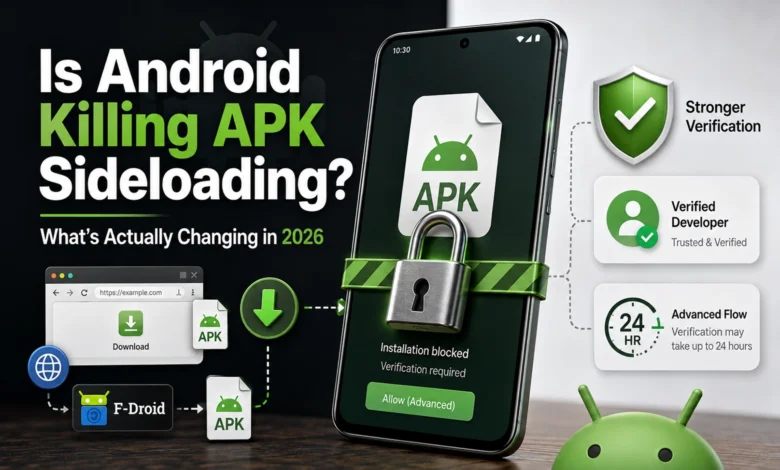
So here’s what actually happened. In August 2026, Google rolled out a system called Advanced Flow worldwide, along with a new option called Limited Distribution Accounts for developers. Then on September 30, 2026, enforcement began for a specific list of participating app stores in Brazil, Indonesia, Singapore, and Thailand, with a broader global rollout planned for 2027.
Notice what’s missing from that sentence: “Google turned off the ability to install APKs from outside Google Play.” That’s not what happened, and it’s not what’s coming next either.
What’s actually changing is narrower than “sideloading is dead,” and more interesting. Android is redefining what makes an app trustworthy in the first place. Developer identity is now becoming a much more explicit part of that equation. An app from a developer Google hasn’t verified can still be installed. The difference is that Android is making users deliberately choose that path.
That distinction is the whole story. It’s worth understanding properly, instead of arguing over a headline.
Table of Contents
What Android Developer Verification Actually Is
Android Developer Verification is Google’s system for confirming who a developer actually is, then linking that identity to the apps they publish. Simple to state: instead of only asking whether a given APK can be installed, Android now has a way to ask who’s actually behind it.
Technically, that means building a chain: developer → package name → signing identity → app. Link those pieces together, and Android can recognize an app as coming from someone accountable, no matter where the file was downloaded from.
Google’s reasoning comes down to a numbers problem. When the company announced this program in August 2025, it cited its own analysis showing more than 50 times as much malware coming from internet-sideloaded sources as from Google Play. Worth a caveat: that’s a Google-reported figure, not an independently audited one, and F-Droid and other critics have pushed back publicly on the lack of a published methodology behind it. Still, the broader pattern isn’t seriously disputed. Anonymous distribution makes it trivial for a banned malware author to just relaunch under a new name tomorrow. Verification is Google’s attempt to make that relaunch-and-repeat cycle a lot more expensive.
What it isn’t: a content review process. Google isn’t deciding whether your app is good, useful, or appropriate before it’s allowed to run. It’s confirming ownership, not judging content. Google has even clarified that registering a package name for an app under NDA doesn’t require disclosing any confidential functionality, since the check only touches identity, not what the app does. The question shifted from “is this app allowed to exist” to “do we know who made it.”
From “Just an APK” to “APK Plus Developer Identity”
Easiest way to picture the shift: compare the two models side by side.
The Android most people grew up with worked like this. A developer builds an APK, signs it, and puts it somewhere, whether that’s Google Play, an alternative store, a personal website, or GitHub. From there, anyone can download and install it. The install experience never really cared where the developer stood in relation to Google.
The new model adds a layer in front of all that: developer identity, then app registration, then the package and signing identity, and only then the Android installer. If a developer is verified and their app is registered, the install experience is essentially unchanged. They can still distribute through a website, a store, wherever they want.
The friction shows up specifically when Android runs into an app it doesn’t recognize as registered. That’s the exact moment Advanced Flow and ADB become the two paths that matter, and it’s also where the “so is Google killing sideloading” argument actually starts.
So, Is Google Actually Killing APK Sideloading?
Is Android Killing APK Sideloading? Well, this is where most of the online arguments start, and it’s also where they tend to go wrong, in one direction or the other.
Say “nothing’s really changing” and you’re ignoring that installing an unregistered app is about to get a lot less convenient, at least in the places where enforcement applies. Say “Google killed sideloading” and you’re ignoring that alternative app stores are still supported, developers can still host an APK on their own website, and there’s still a path in even for apps that aren’t verified at all.
Both answers are wrong, or at least incomplete. Getting to the real one means understanding four things Google actually built: a path for power users who know exactly what they’re doing, a very specific reason for a 24-hour delay that has nothing to do with reviewing your APK, a distinction that keeps ADB almost completely untouched, and two very different ways for a developer to register an app in the first place.
Let’s take them one at a time, starting with the group Google built this whole system around: people who sideload on purpose.
Advanced Flow: The Power User’s Way Around Verification
Google knows a meaningful slice of Android users install software from unverified sources on purpose. Developers testing their own builds. Custom ROM and GrapheneOS people. F-Droid users running open-source apps whose maintainers haven’t gone through registration. Testers, hobbyists, anyone who actually knows what a signing key is and wants to make their own call about what runs on their own hardware.
Google didn’t want that group turning into collateral damage from a security feature built for scam victims. So Advanced Flow keeps the door open, on one condition: you have to actively prove you understand the risk first. Google calls it a one-time setup for power users making an informed trade-off. That’s a fair description.
How Advanced Flow Actually Works
Google lays out the flow as five checkpoints, and each one solves a different, real problem.
- Turn on Developer Mode. A toggle in system settings, deliberately buried, so nobody trips it by accident or with one panicked tap.
- Confirm you’re not being “coached”. Android checks that no one’s walking you through this in real time. Sounds strange until you think about how these scams actually work: a caller talks a victim through settings, step by step, turning what should be a red flag into something that feels like following instructions.
- Restart the phone and reauthenticate. This cuts the connection to anyone watching or guiding the process remotely, including someone still on the phone with the victim.
- Wait 24 hours, then verify again. After starting the flow, you wait a full day, then confirm with biometrics or a PIN.
- Install. From here on, apps from unverified developers can be installed, still with a warning each time, but with the option to tap through it. You can enable this for 7 days or indefinitely. It’s a one-time setup, not something you repeat for every app.
One detail worth knowing: there’s no ADB command to skip the 24-hour wait, at least not yet. Google has said it might reconsider that down the line, but for now, everyone goes through the same clock.
Why the 24-Hour Wait Isn’t “24 Hours Per APK”
This misconception is worth killing off directly, because it’s the detail that makes Advanced Flow sound far worse than it actually is.
Google isn’t saying you wait a day every time you sideload something. If that were true, Advanced Flow would function as a real deterrent against the exact people it was built for. The wait belongs to setup, not to each install. Finish it once, and you keep installing unverified apps going forward, no repeat process required. It’s tied to your account too, so it carries over automatically if you switch phones.
What the 24 hours is actually targeting is urgency. Scammers rely on manufactured pressure, the feeling that something has to happen right now, on this call, before you have time to think it over or ask anyone else. A mandatory day between “start this change” and “confirm this change” breaks that pressure by design. It’s not there to slow down someone who already knows what they’re doing. It’s there to give someone being coerced enough time to notice.
ADB: The Developer Path That Barely Changed
If Advanced Flow is the door for power users, ADB is the door nobody really touched.
Installing apps through Android Debug Bridge is unaffected by any of this, according to Google. Developers can keep using it for testing, for development builds, for anything that isn’t ready for wider release yet, and none of it comes with the 24-hour wait tied to Advanced Flow. Build an APK, plug in the device, install it. Same as always.
Worth being precise about what Advanced Flow is not, too. It has nothing to do with rooting or unlocking a bootloader. No flashing firmware, no patching boot images, no Magisk, no touching Android’s security model at all. All you’re doing is telling Android, deliberately and verifiably, that you understand an app isn’t from a verified developer and you’re choosing to install it anyway. That makes Advanced Flow considerably simpler than rooting a device. What Google added here is friction in installation trust, not a new layer of system access.
How Developer Identity Actually Works Under the Hood
None of this depends on Google manually reviewing every APK before it’s allowed to run, and developers don’t have to hand over source code either. Registering means verifying your identity, then registering a package name. For a brand-new app, that just means submitting your signing key’s public certificate. For an app that’s already out there, Google asks for proof: sign an APK with the corresponding private key and upload it.
On the device side, a background system service called Android Developer Verifier has been quietly rolling out since June 2026, visible under Google System Services on certified devices running Android 7 or higher. Its only job is checking whether an installing app matches a registered developer and signing identity, not inspecting what the app actually does.
To support this, Google shipped a couple of companion tools in July 2026. The Android Developer ID Status API lets developers check if a given package name is already registered, while the newer Android Developer Console API allows them to manage registrations directly from a CI/CD pipeline.
Together, this amounts to Google building trust infrastructure for Android at the platform level, which is a considerably bigger architectural shift than just adding a new install pop-up warning.
Full Distribution vs. Limited Distribution: Not Every Developer Has to Become a Company
One legitimate worry when this program was first announced: would Google offer developers exactly one choice, full identity verification or nothing (stop distributing apps)? Well, that’s not what happened. Google split registration into two tracks aimed at two very different kinds of developers.
| Full Distribution | Limited Distribution | |
|---|---|---|
| Best for | Companies and professional developers distributing widely | Students, hobbyists, and personal projects |
| ID verification required | Yes, plus a $25 one-time fee | No, and it’s free |
| Distribution reach | Any app store or channel, including your own website | Up to 20 authorized devices |
| Install experience | Unchanged from today | Recipients accept an invite to install from a developer they know |
Full Distribution is for developers who want to publish widely through any channel they pick. It requires verified identity plus a one-time $25 fee, which Google says covers administrative costs. Cheaper than Apple’s $99-a-year developer fee, if you’re keeping score, though the comparison only goes so far. Organizations registering this way also need a D-U-N-S number, a standard business identifier.
Limited Distribution exists so hobbyists, students, and people just learning Android development don’t need a full identity check to share a project with a few friends. It’s free, skips the government ID, and caps out at 20 authorized devices. Skip this tier entirely, and the practical effect would have been pushing casual and student developers out of sideloading altogether. That’s exactly the outcome it was built to avoid.
What If a Developer Doesn’t Want to Verify at All?
They don’t have to, at least not to keep an app alive. A developer can leave an app unregistered indefinitely. Google now describes exactly three distribution paths: Full Distribution, Limited Distribution, and sideloading unregistered apps.
The catch shows up once enforcement is active in a given region. From that point, installing or updating an unregistered app means going through Advanced Flow or ADB sideloading instead of the default path. Unregistered doesn’t mean removed from Android. It means the person installing it has to consciously step outside the default trust path to do it.
What September 30, 2026 Actually Means
This date has produced some of the most misleading headlines in the whole story, so let’s be precise about it.
September 30, 2026 is not a global cutoff where every sideloaded APK everywhere (suddenly) stops working. The first enforcement phase applies only to certified Android devices in four countries: Brazil, Indonesia, Singapore, and Thailand. On top of that regional limit, enforcement only covers a specific list of participating stores: Google Play, HONOR App Market, OPPO App Market, Samsung’s Galaxy Store, Transsion’s Palm Store, vivo’s V-Appstore, and Xiaomi’s GetApps.
That second detail matters more than most coverage gives it credit for. Google’s own FAQ is explicit: if an app is distributed through a store that isn’t on that list, or sideloaded directly, the September 2026 requirements don’t apply to it yet. Nothing changes for that install path in this initial phase, though Google is telling developers to register anyway, ahead of the wider rollout.
Put simply, September 30, 2026 is the start of the rollout, not the end of sideloading. Google plans to expand to all certified Android devices globally sometime in 2027, after taking in feedback from this first phase.
Some context on how we got here, since it helps explain why 2026 feels sudden even though it isn’t: Google actually announced this whole program back in August 2025, with early developer access opening that October. What’s landing through 2026 and into 2027 is the enforcement rollout, not a brand-new policy that appeared out of nowhere.
| When | What happens |
|---|---|
| August 2025 | Google first announces Android Developer Verification |
| March 30, 2026 | Verification opens to all developers through Play Console and the new Android Developer Console |
| June 2026 | The Android Developer Verifier system service begins rolling out to devices; early access opens for Limited Distribution accounts |
| July 2026 | The Android Developer ID Status API launches globally; early access opens for the Android Developer Console API |
| August 2026 | Limited Distribution Accounts, the Android Developer Console API, and Advanced Flow all launch globally |
| September 30, 2026 | Enforcement begins in Brazil, Indonesia, Singapore, and Thailand, for participating app stores only |
| 2027 and beyond | Planned global rollout to all certified Android devices |
So, Is Android Becoming a Closed System?
Not in the traditional sense. Google’s position is that Android stays a multi-channel ecosystem: developers keep their choice of distribution, users keep multiple install sources, and most people won’t notice any of this, since almost everything they already install comes from developers who are verified by default.
“Nothing is changing” isn’t quite right either, though. The more accurate way to put it: Android stays open, but trust on Android is becoming more conditional than it used to be. Not everyone thinks that transition will be painless. F-Droid and a coalition of digital rights groups, including the EFF, have publicly called the policy an existential threat to how they distribute pseudonymously re-signed apps, and Google has said third-party store compatibility is still being worked out. It’s also drawn attention in Europe, where regulators reviewing the Digital Markets Act have asked whether mandatory developer registration fits the bloc’s push for platform interoperability.
The Real Shift: From Source-Based Trust to Identity-Based Trust
This is probably the most useful way to think about everything above.
For most of Android’s history, one of its defining traits was that you controlled where your software came from. Google Play was the default, never the only option. Websites, F-Droid, third-party stores, direct APKs, dev tools, all of it had a legitimate place, and where an app came from was effectively the main signal of trust.
Developer identity was never completely absent from that picture, to be fair. Signing keys have always been how Android confirms that an update to an app came from the same developer as the original install. But that identity was self-asserted. Nobody checked whether the key actually belonged to a real, accountable person or company. Developer Verification changes that specific piece: identity now gets checked once, by Google, then carried through the entire installation trust model, instead of being quietly assumed at update time.
Instead of the main question being “where did this app come from,” Android increasingly cares about “who’s actually accountable for it, and has anyone confirmed that.” That’s the move from source-based trust toward something closer to identity-based trust. It’s likely to matter more over time than the September 2026 deadline itself, because it reshapes what “open” is going to mean on Android from here on, regardless of exactly where this particular rollout ends up landing.
What This Actually Means for You
If you only ever install from Google Play, or from developers who’ve already verified, this entire rollout is close to invisible. Google says the vast majority of Play apps were registered automatically through Play App Signing, and more than 99% of apps on Play have already been registered. For most people, the experience stays exactly what it’s always been: search, install, open, no idea any of this exists underneath.
But, if you’re the kind of user who deliberately sideloads from unverified developers, whether that’s a custom ROM tool, an F-Droid app whose maintainer hasn’t registered, or something you found on a forum, Advanced Flow is where you’ll spend time. It’s still genuinely open to you. It just asks for a one-time, slightly annoying setup instead of a single tap, and once it’s done, it stays done.
If you’re a developer, ADB remains your unaffected fast lane for testing. If you’re distributing more broadly, the real decision is Full Distribution versus Limited Distribution, based on how wide your actual audience is, not whether you’re willing to identify yourself at all.
So, back to the four things worth understanding, and the question underneath all of them. Is Google killing APK sideloading?
If that means no more APKs from outside Google Play, ever: no. That’s not what’s happening, not now, and not in the 2027 plans Google has published so far.
If it means installing something from a developer Google hasn’t verified is about to stop being a single, no-questions-asked tap: yes. That’s exactly what’s happening, in stages, through 2027.
Android isn’t just asking “do you want to install this APK” anymore. It’s starting to ask something closer to “do you know who made this, and are you sure you want to trust them without Google’s sign-off.” For most users, that question will never come up. For the sideloaders, ROM flashers, F-Droid users, and indie developers who built their whole relationship with Android around not needing anyone’s permission, it’s a real change, even though the door hasn’t actually closed.
It’s just gotten a lock. And for now, at least, there’s still a key.
Enjoyed the article?